
Download Broadband Usage Meter – Internet Tracking, Bandwidth Monitoring, Real-Time Data Usage
Overview
The Broadband Usage Meter is a dedicated desktop utility designed to help users monitor their internet bandwidth consumption in real time. It serves as a streamlined solution for individuals who want to track their data usage without the need to log into their ISP’s website or navigate through account portals. This tool is particularly useful for users on capped internet plans, where exceeding monthly data limits can result in throttling or additional charges. By displaying live usage statistics directly on the desktop, the application enables proactive management of data consumption, helping users stay within their allocated limits.
Target users include home users, remote workers, students, and anyone with limited or metered internet access. The application is especially beneficial for those managing multiple devices on a shared connection or those who rely on mobile broadband. Although the developer did not provide additional background information, the app has been available since 2007, indicating a long-standing presence in the utility software space. Its compatibility with all ISPs suggests a broad appeal across different network environments, making it a versatile tool for diverse user needs.
Within the broader software ecosystem, the Broadband Usage Meter fills a niche by offering a lightweight, persistent monitoring solution. Unlike browser-based tools, it operates independently and does not require active internet access to function. This makes it a reliable companion for users seeking continuous visibility into their data usage without additional overhead.
Key Features & Functionality
- Live Usage Monitoring: The application delivers real-time tracking of internet bandwidth usage, updating data as connections are active. This allows users to observe spikes in data consumption during downloads, video streaming, or software updates, enabling informed decisions on usage habits.
- Universal ISP Compatibility: Designed to work across all internet service providers, the tool does not rely on proprietary APIs or login credentials. It functions independently of the user’s network provider, making it a consistent monitoring solution regardless of location or service type.
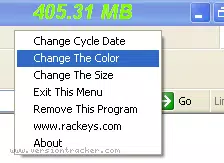
- Customizable Desktop Interface: Users can reposition the meter on the desktop, adjust its size, and choose color schemes to suit their preferences. The interface remembers these settings, ensuring a personalized experience upon each launch.
- Zero Bandwidth Consumption: The utility operates without consuming any data during its operation. This ensures that monitoring usage does not contribute to the user’s data footprint, a critical feature for those on strict data caps.
- Auto-Hide Functionality: When the internet connection is inactive, the meter automatically minimizes, reducing desktop clutter. Upon reconnection, it reappears seamlessly, maintaining continuous monitoring without user intervention.
For example, a remote worker on a limited mobile hotspot plan can use the meter to monitor data usage during video calls, ensuring they do not exceed their monthly allowance. Similarly, a student managing a shared home network can use it to identify which devices are consuming the most data, helping to enforce fair usage policies.
Interface, UX & Performance
The Broadband Usage Meter features a minimalist, desktop-oriented interface that integrates smoothly into the user’s workflow. Its design emphasizes functionality over visual complexity, with a simple, unobtrusive meter display that can be placed anywhere on the screen. Navigation is intuitive, relying primarily on a right-click context menu to access settings and preferences. This approach minimizes disruption to the user’s primary tasks.
Users can customize the appearance, including size, color, and position, with changes saved automatically. The interface remains responsive even during high network activity, ensuring that real-time updates are delivered without lag. Although the developer did not list formal performance metrics, the application is described as resource-efficient, suggesting low CPU and memory usage.
Performance across different device categories is not formally documented. However, given its lightweight nature and long-standing presence since 2007, it is likely optimized for a wide range of desktop systems. Stability appears to be a key strength, as the app maintains consistent operation over extended periods without crashes or memory leaks.
Platform Compatibility & Technical Requirements
The Broadband Usage Meter is designed for desktop environments and is compatible with Windows operating systems. Specific OS versions were not listed by the developer, so compatibility with newer or older Windows releases cannot be confirmed. The application has a file size of 1.4 MB, indicating a lightweight footprint that requires minimal storage space.
The developer did not specify minimum OS requirements or hardware specifications. As such, users should ensure their system meets general Windows compatibility standards. The app is not available for mobile platforms such as Android or iOS, and no information about APK availability or mobile installation was provided.
Pros and Cons
Pros
- Real-time, accurate bandwidth monitoring without requiring ISP login
- Compatible with all internet service providers
- Does not consume any bandwidth during operation
- Highly customizable interface with persistent user preferences
- Auto-hides when internet is offline, reducing desktop clutter
Cons
- Not available for mobile devices or iOS/Android platforms
- Specific OS compatibility details were not disclosed
- No official update frequency or release history provided
- Interface may appear outdated to users accustomed to modern UI standards
- Limited technical documentation or support resources available
FAQ
Is Broadband Usage Meter safe to install?
Yes, the application is designed as a lightweight utility and does not require elevated permissions. It operates without accessing sensitive system data or modifying core settings.
Can I use this app on my mobile device?
No, the Broadband Usage Meter is a desktop application and is not available for Android or iOS devices. It is designed exclusively for Windows-based systems.
Does the app use internet data while running?
No, the application does not consume any bandwidth during its operation. It monitors network traffic locally and does not transmit data externally.
How do I update the app?
Update information was not provided by the developer. Users are advised to check the official website for the latest version if available.
Is the app free to use?
The pricing information was not disclosed. Users should refer to the official source for details on cost or licensing.
Final Thoughts
The Broadband Usage Meter stands out as a reliable, no-frills tool for users who need continuous, accurate monitoring of their internet data usage. Its ability to operate independently of ISPs, consume no bandwidth, and adapt to user preferences makes it a valuable utility for anyone on a capped plan. While its interface may feel dated and it lacks mobile support, its core functionality remains effective and efficient.
For users seeking a straightforward, lightweight solution to avoid data overages, this app delivers consistent performance without unnecessary complexity. Its long-standing presence in the software market speaks to its reliability and enduring usefulness.
Download Broadband Usage Meter now


